Alignor
Designing an AI-powered marketing platform that brings campaigns, automation, collaboration, and analytics into one intelligent workspace.
Marketing teams often rely on multiple disconnected tools to plan campaigns, manage assets, automate workflows, analyze performance, and collaborate across departments. Alignor centralizes these workflows into a single AI-assisted platform, helping teams execute campaigns faster, reduce operational complexity, and make better marketing decisions.
Responsibilities
Scope of work across strategy, structure, and interface design
- UX Research
- Information Architecture
- User Flows
- Wireframing
- UI Design
- Design System
- Interactive Prototype
Primary Users
User groups the platform was designed to support
- Marketing Managers
- Marketing Specialists
- Content Teams
- Business Stakeholders
Impact Stats
Plan, manage, and execute campaigns from one connected workspace.
Generate recommendations, automate repetitive tasks, and accelerate campaign creation.
Keep marketing, content, and stakeholders aligned throughout campaign execution.
Support growing teams through reusable workflows and centralized assets.
Modern marketing teams lose valuable time switching between disconnected planning, content, automation, analytics, and collaboration tools. Alignor was designed to unify these workflows into one intelligent platform.
The Problem
Disconnected marketing tools slowed execution and reduced visibility
Disconnected marketing tools slowed execution, increased manual work, and reduced visibility across campaign performance.
- Campaign planning scattered across multiple tools
- Manual reporting
- Difficult collaboration
- Repeated content management
- Limited campaign visibility
The Solution
An AI-assisted workspace connecting campaign execution end-to-end
Alignor introduces an AI-assisted marketing platform that connects campaign planning, execution, collaboration, automation, and analytics into one workspace.
- Unified campaign management
- AI-assisted content creation
- Centralized assets
- Connected workflows
- Real-time campaign insights
Design Constraints
Balancing flexibility with simplicity for enterprise teams
Designing for enterprise marketing teams required balancing flexibility with simplicity.
- Constraint 01
Data Volume
Large volumes of marketing data needed clear structure and scanability.
- Constraint 02
Role Diversity
Multiple team roles required distinct needs within one shared system.
- Constraint 03
Cross-channel Work
Campaigns spanning multiple channels required connected workflows.
- Constraint 04
Information Density
High information density demanded strong hierarchy and focus.
- Constraint 05
Real-time Collaboration
Teams needed rapid updates and shared context across execution.
- Constraint 06
Scalable Architecture
Workflow architecture had to scale as teams and channels grew.
Success Metrics
Expected outcomes used to validate product direction
These KPI cards represent expected outcomes rather than measured analytics.
Campaign Journey
How Alignor simplifies each stage of campaign execution
- Stage 01
Campaign Planning
Centralized planning removes fragmented setup across tools.
- Stage 02
Audience Selection
Connected audience data improves targeting speed and accuracy.
- Stage 03
Content Creation
AI-assisted creation reduces repetitive drafting and refinement cycles.
- Stage 04
Approval
Shared review context keeps teams aligned and reduces delays.
- Stage 05
Automation
Reusable workflows reduce manual orchestration effort.
- Stage 06
Launch
Coordinated publishing improves execution confidence across channels.
- Stage 07
Performance Monitoring
Live metrics provide immediate visibility into campaign outcomes.
- Stage 08
Optimization
Actionable insights support faster iteration and better ROI.
Before Alignor
Fragmented workflows created operational drag
- Multiple disconnected marketing tools
- Manual reporting
- Repeated campaign setup
- Fragmented collaboration
- Limited visibility
After Alignor
One connected workspace for faster campaign execution
- One connected workspace
- AI-assisted workflows
- Faster campaign execution
- Centralized collaboration
- Real-time analytics
Design Process
From workflow research to scalable enterprise product decisions
A structured process focused on optimizing campaign workflows, collaboration, and AI-assisted enterprise execution.
- Step 01
Research
Understand marketing workflows, collaboration patterns, and campaign execution.
- Step 02
Problem Definition
Identify bottlenecks across campaign planning and execution.
- Step 03
Information Architecture
Organize campaigns, assets, automation, analytics, and collaboration into a scalable structure.
- Step 04
Interface Design
Design intuitive enterprise workflows supported by reusable components.
- Step 05
Prototype & Iterate
Validate workflows and continuously improve usability.
User Personas & Needs
Understanding the primary users, their motivations, challenges, and how the product supports their goals.

Marketing Manager
Plans campaigns, allocates budgets, and monitors marketing performance.
Goals
- Launch campaigns faster
- Track ROI
- Improve performance
Pain Points
- Fragmented tools
- Manual reporting
- Poor visibility
Needs
- Unified dashboard
- Analytics
- AI recommendations
Primary Tasks

Marketing Specialist
Creates campaigns and optimizes marketing activities.
Goals
- Build campaigns
- Manage audiences
- Improve performance
Pain Points
- Manual tasks
- Complex setup
- Multiple platforms
Needs
- Automation
- AI workflows
- Audience management
Primary Tasks

Content Team
Creates and manages creative assets.
Goals
- Deliver content faster
- Maintain consistency
- Collaborate efficiently
Pain Points
- Asset duplication
- Slow reviews
- Communication gaps
Needs
- Asset library
- Reviews
- Version control
Primary Tasks

Business Stakeholder
Monitors business performance and strategic outcomes.
Goals
- Measure success
- Improve growth
- Make strategic decisions
Pain Points
- Limited reporting
- Delayed insights
- Inconsistent metrics
Needs
- Executive dashboards
- KPIs
- Reporting
Primary Tasks
Design Principles
Principles Guiding Product Design
- Prioritize campaign visibility.
- Reduce repetitive work through automation.
- Keep collaboration frictionless.
- Surface insights before raw data.
- Design scalable enterprise workflows.
Information Architecture
Campaign-lifecycle structure for lower workflow friction
The platform structure follows the natural lifecycle of marketing campaigns, allowing users to move seamlessly from planning to execution, optimization, and reporting.
- Dashboard
- Campaigns
- Automations
- Audiences
- Contacts
- Content Library
- Analytics
- AI Assistant
- Notifications
- Settings
Key Features
Core capabilities that support planning, execution, and optimization
Each module is designed to reduce manual overhead while improving team visibility and decision quality.
Campaign Management
Plan, organize, and monitor every campaign from a centralized dashboard.
AI Campaign Assistant
Generate recommendations, automate repetitive work, and improve campaign efficiency.
Audience Management
Segment audiences and personalize marketing strategies.
Asset Management
Organize creative assets and streamline collaboration.
Workflow Automation
Reduce manual effort through automated campaign workflows.
Performance Analytics
Visualize campaign performance through actionable dashboards.
Design Decisions
Decisions made to improve speed, clarity, and enterprise scalability
Each decision was made to reduce complexity while keeping marketers in control of strategy and execution.
Dashboard
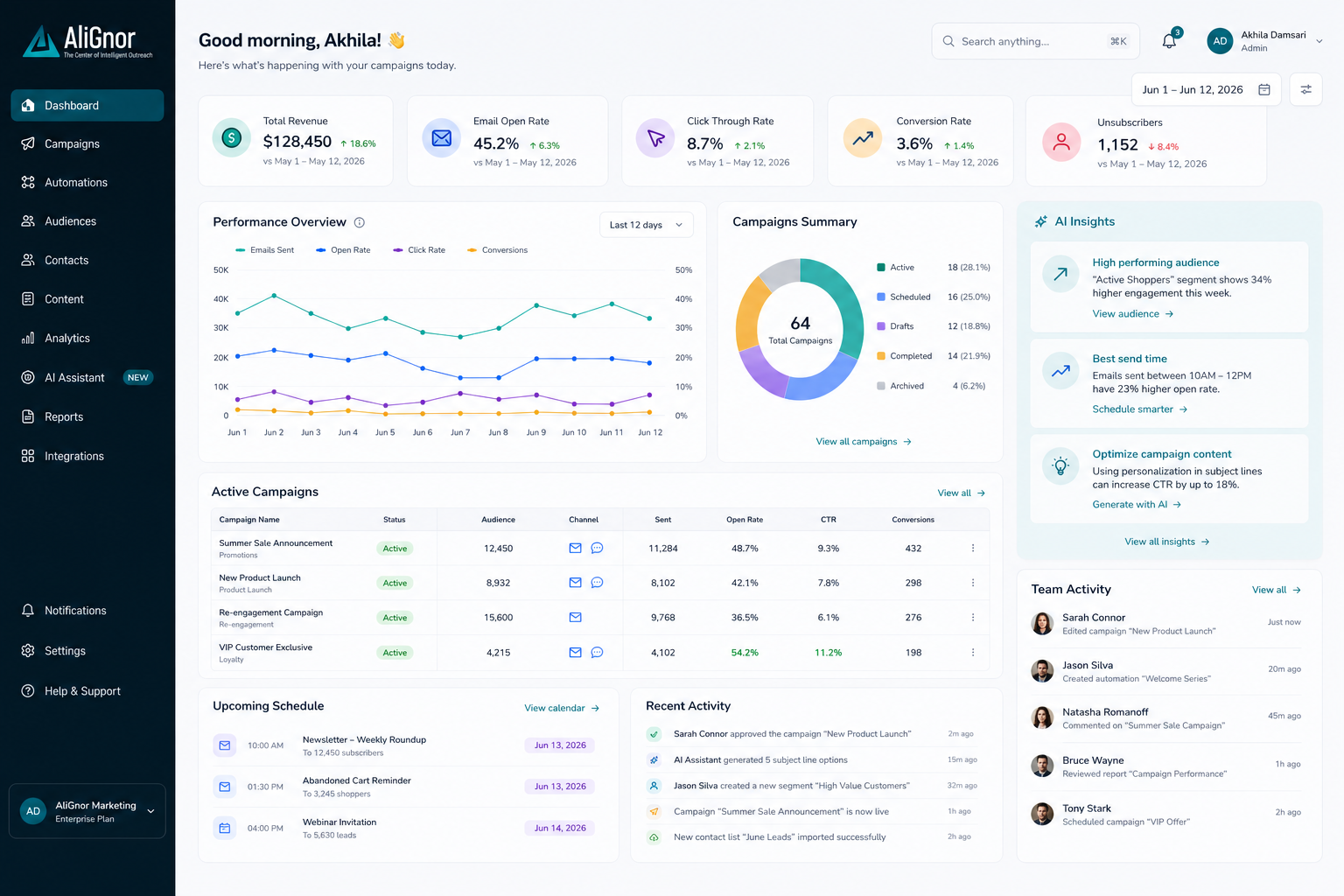
Prioritizes campaign performance, active work, and team activity to support faster decision making.
AI Integration
AI supports users without replacing human decision making, reducing repetitive work while maintaining creative control.
Progressive Disclosure
Advanced campaign settings appear only when necessary, reducing cognitive load.
Reusable Components
Consistent UI patterns improve scalability across enterprise workflows.
Navigation
Persistent navigation allows teams to move between planning, automation, analytics, and assets without losing context.
Accessibility
Typography, spacing, and hierarchy improve readability during long working sessions.
UI Highlights
Annotated screens showing why each interface region exists and how it supports better campaign execution.
Design System Overview
Reusable components that support consistency and scale
A shared component system ensures consistent interactions and enables scalable expansion across enterprise marketing workflows.
- 01
Buttons
Consistent action hierarchy across campaign workflows.
- 02
Cards
Scannable summaries for campaigns, assets, and tasks.
- 03
Forms
Structured inputs for setup, targeting, and configuration.
- 04
Tables
Dense operational views for enterprise data management.
- 05
Charts
Performance trends translated into actionable insight.
- 06
Status Chips
Quick state indicators for progress and campaign health.
- 07
Navigation
Persistent access across planning, automation, and analytics.
- 08
Badges
Lightweight context markers for counts and alerts.
Accessibility Considerations
Designed for readability and sustained usage
- WCAG AA contrast
- Readable typography
- Consistent spacing
- Keyboard accessibility
- Clear hierarchy
- Large interaction targets
Design Trade-offs
Rationale behind key product decisions
- Why dashboard-first? Marketing managers begin their day reviewing campaign performance before editing campaigns.
- Why progressive disclosure? Advanced configuration remains hidden until required, reducing complexity.
- Why cards instead of tables? Campaign summaries are easier to scan visually.
- Why AI recommendations instead of automation-only? Users remain in control while AI accelerates repetitive work.
Future Opportunities
Roadmap directions for continued enterprise growth
These opportunities represent future product evolution beyond the current concept scope.
- Roadmap 01
AI-generated campaign briefs
Accelerate kickoff workflows with structured strategic drafts.
- Roadmap 02
Predictive performance forecasting
Anticipate campaign outcomes before launch.
- Roadmap 03
Multi-channel publishing
Coordinate deployment across channels from one workflow.
- Roadmap 04
Social media integrations
Connect social campaign execution and analytics.
- Roadmap 05
CRM integrations
Sync customer context to improve personalization and attribution.
- Roadmap 06
Generative content workflows
Scale content variants while preserving brand and strategy control.
Expected Impact
Operational outcomes expected from a unified marketing workspace
- Reduce campaign setup time
- Improve cross-team collaboration
- Increase operational efficiency
- Centralize marketing workflows
- Enable scalable enterprise marketing operations
Key Takeaways
Lessons that strengthened enterprise product thinking
Designing Alignor reinforced several important lessons.
- Enterprise products should simplify complexity without limiting flexibility.
- AI should enhance human decision making rather than replace it.
- Collaboration is just as important as automation.
- Good information architecture improves every stage of campaign execution.
If I Had More Time
Next steps to evolve Alignor further
With additional time I would continue evolving Alignor through:
- Usability testing with marketing teams
- Expanded AI workflows
- CRM integrations
- Multi-channel publishing
- Mobile companion experience
- Accessibility validation
- Advanced personalization
Alignor demonstrates how thoughtful product design and AI-assisted workflows can simplify enterprise marketing operations while enabling teams to execute campaigns with greater speed, confidence, and collaboration.